
I am regularly asked how I edit my photos. I am open and honest about it! You can read more about it in other Nertalk blogs. This article focuses on the NVMe cache (read-only) in a Synology DS1621+ station.
‘Is NVME-cache worth wile?’
I upload the photos to my NAS using the USB-A port on the front of my station. Internally, through DSM, I drag and drop the photos to the right location, which, in my case, is year/assignment/capture.
About a year ago, I inserted a WD NVMe cache stick (SN700) that can be found here. The 1TB stick is configured as read-only and is also the only NVMe cache SSD in the Synology.
At first, I made the mistake of turning off the Synology DS1621+ in the evening using the power schedule in DSM 7.1. If you do that, you lose all the cached data in memory. If you want the Synology to be able to turn off in the evening, you need two SSDs that you set to read-write. I discovered this issue because my hit rate was never above 40% in DSM 7.
“TURNING OFF THE NAS MEANS YOUR CACHE WILL BE CLEARED.”
Is NVMe cache in your Synology worth it?
If there is any noticeable difference in speed, then my answer is: no. It’s not worth putting an NVMe SSD in your Synology DS1621+. This advice applies in the following situation:
- You’re seeking advice for photo editing.
- You’re considering the WD Red SN700.
- You’re using the Read-Only mode.
In my opinion, the fastest way remains local editing, but with projects of over 100/200 TB, it’s simply not possible to store everything locally on my computer. The NAS provides fantastic space for RAW files that I import by the thousands. I have conducted various speed tests using Black Magic Disk Speed and AmorphousDiskMark. Where I do notice a speed difference is when copying large files (8GB+), such as a single large file. That is much faster than copying 300 * 25MB files.
NVME Snelheden
Here are the speeds of the DS1621+ with NVME Cache. The same speeds (30/40 megabits, which I find negligible) can be observed without the cache installed.
Especially non-sequential read and write operations (such as searching for photos on your disk) have seen little improvement.
Specs:
DS1621+ with DSM 7.1
WD Red (4x4TB) / IronWolf (2x4TB) drives
8GB RAM
1TB SN700 WD Red
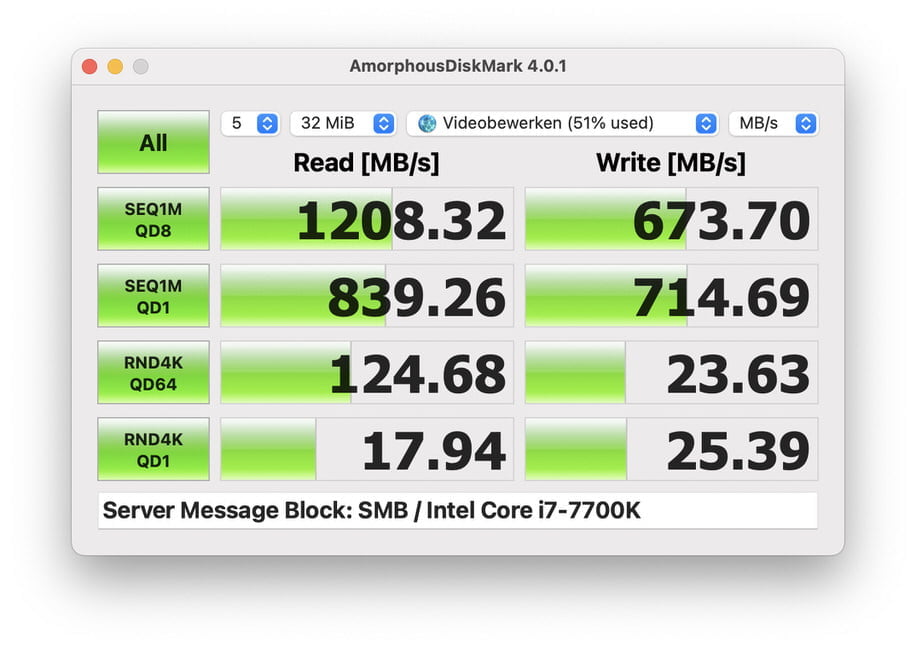
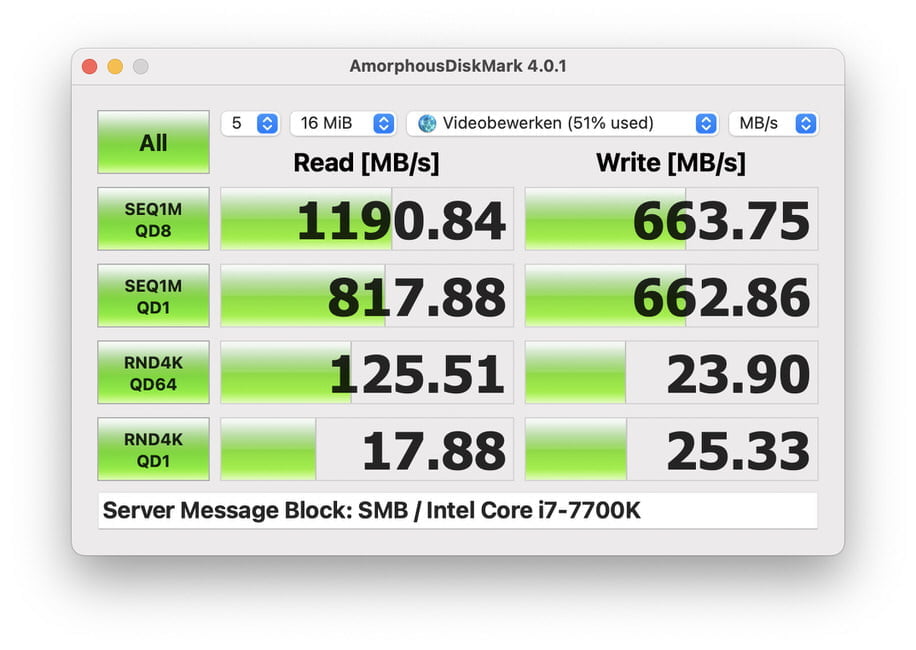
Note: the new NVME pool in DSM 7.2 has not been tested yet. These tests are scheduled for 2024.